Programs, Processes, and Execution
You write code in a file. You hit "run." Something happens. But what exactly?
Most developers treat this as magic. Senior engineers understand the mechanics. That understanding changes how you debug, how you optimize, and how you think about the systems you build.
A Program is a Recipe; A Process is the Cooking
Here's the distinction that clarifies everything:
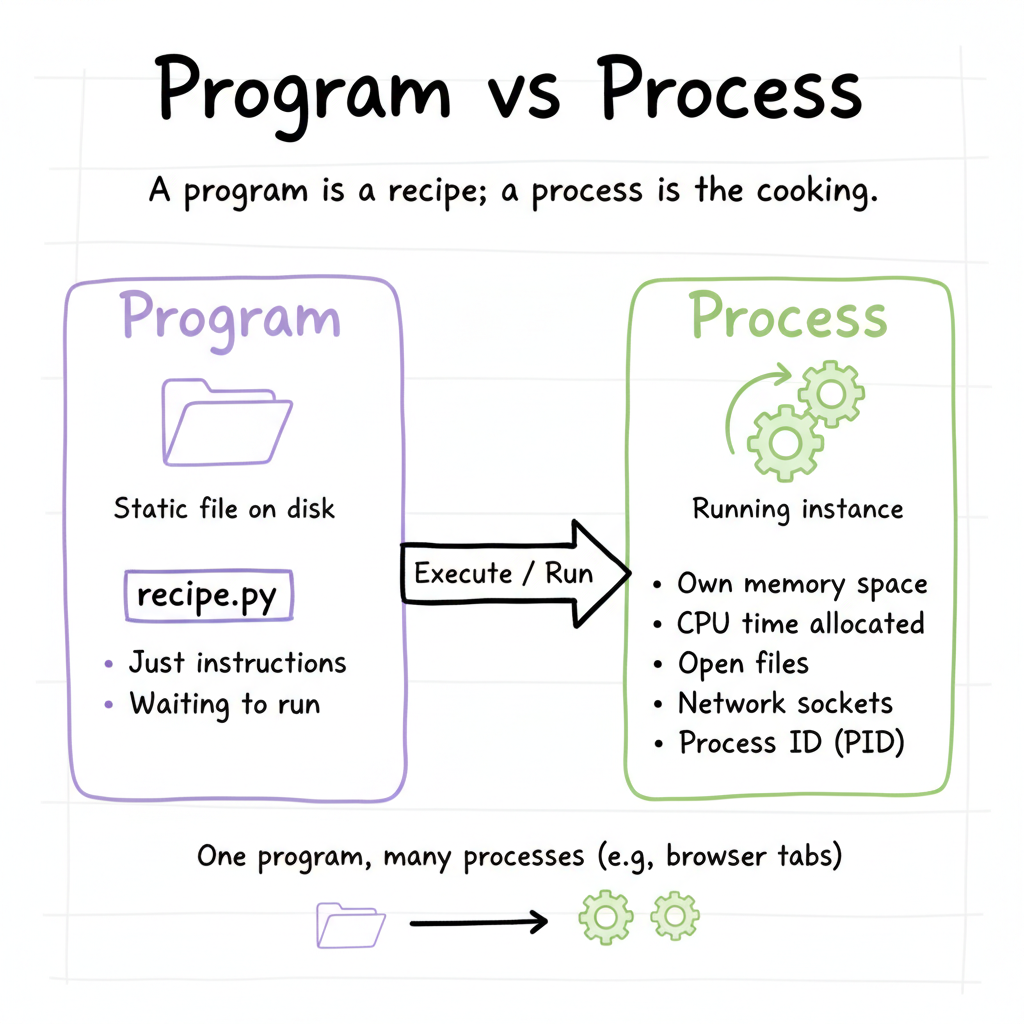
A program is a file on disk. It's static. It's just instructions waiting to be executed. Think of it as a recipe sitting in a cookbook.
A process is a program in execution. It's alive. It has memory, state, and resources allocated to it. Think of it as actually cooking the recipe in your kitchen.
You can have one recipe (program) and cook it multiple times simultaneously (multiple processes). When you open three browser windows, you might have three processes all running from the same browser program.
What Actually Happens When You Run Code
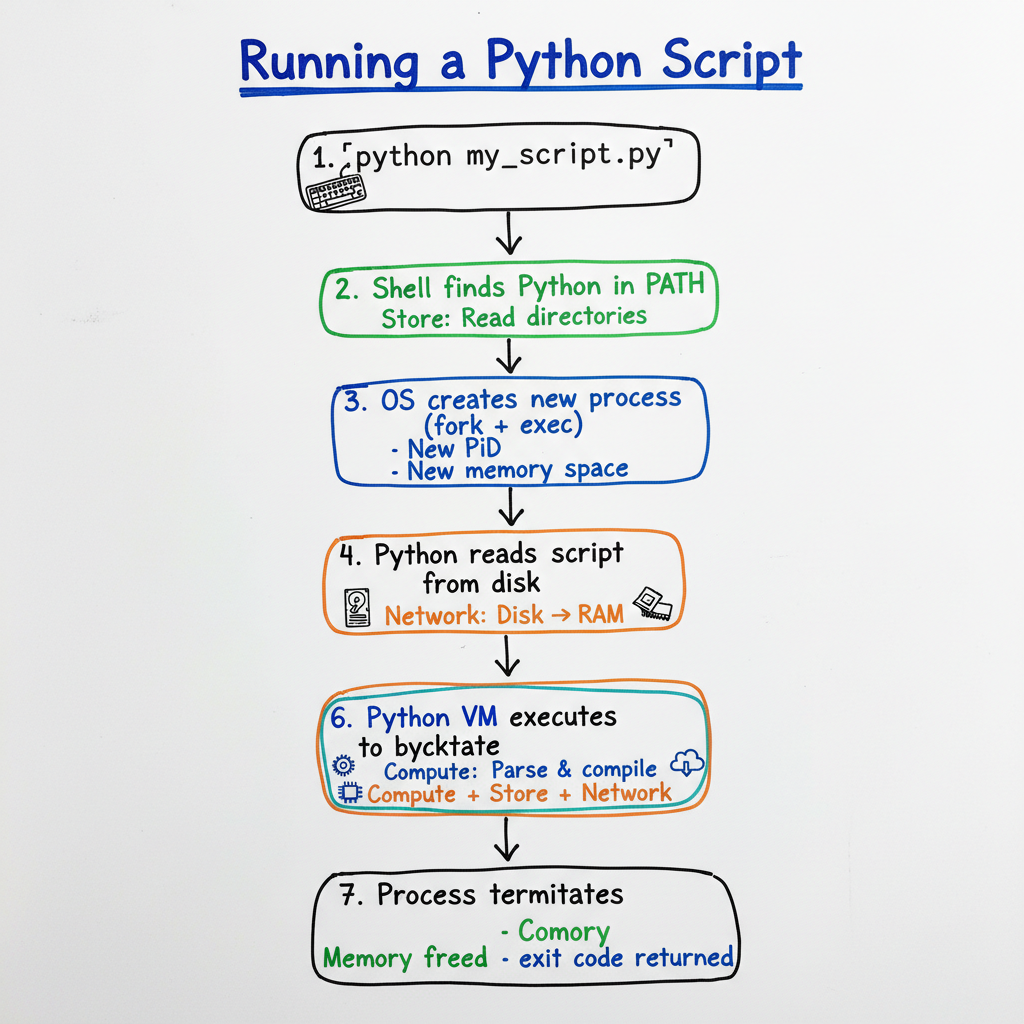
Let's trace through what happens when you run a Python script. Every step involves our three pillars: Compute, Store, Network.
Step 1: You Type the Command
python my_script.py
Your shell (like bash or zsh) receives this command.
Step 2: The Shell Finds the Program
The shell searches through directories listed in your PATH environment variable to find the python executable.
- Store: Reading directory listings from disk
- Compute: Comparing strings to find a match
Step 3: The Operating System Creates a Process
The OS performs a fork() and exec() (on Unix systems):
- fork(): Creates a copy of the current process (the shell)
- exec(): Replaces that copy with the Python interpreter
Now you have a new process with:
- Its own process ID (PID)
- Its own memory space
- Its own file descriptors
Step 4: Python Reads Your Script
The Python interpreter (now running as a process) reads my_script.py from disk.
- Network: Data flows from disk to RAM
- Store: The file contents are stored in memory
- Compute: Python parses the text into an abstract syntax tree
Step 5: Python Compiles to Bytecode
Python compiles your source code into bytecode. This is an intermediate representation that's faster to execute than parsing text each time.
- Compute: The compilation process
- Store: Bytecode stored in memory (and optionally cached as
.pycfiles)
Step 6: The Python Virtual Machine Executes
The Python VM interprets the bytecode, executing each instruction:
x = 5        # Store: allocate memory, write value
y = 10       # Store: allocate memory, write value
z = x + y    # Network: load values, Compute: add, Store: save result
print(z)     # Network: send to stdout
Step 7: The Process Terminates
When the script finishes:
- Memory is freed
- File handles are closed
- The OS reclaims resources
- The exit code is returned to the parent process (your shell)
Process Isolation: Why It Matters
Here's something crucial: each process has its own memory space.
Process A cannot directly read or write Process B's memory. The operating system enforces this boundary. This is called process isolation.
Why does this matter?
1. Stability
If Process A crashes, Process B keeps running. A buggy browser tab doesn't bring down your entire operating system.
2. Security
A malicious program can't directly read passwords stored in another program's memory. The OS acts as a security boundary.
Whoever controls the memory controls the machine.
— Kumar Pratik
3. Simplicity
When you write code, you don't have to worry about other processes accidentally overwriting your variables. Your memory space is yours alone.
The Trade-off
Process isolation means processes can't easily share data. If two processes need to communicate, they must use explicit mechanisms:
- Files: Write to disk, other process reads
- Pipes: Stream data from one process to another
- Sockets: Network-style communication, even on the same machine
- Shared memory: A designated region both processes can access (with careful coordination)
This is the trade-off: isolation provides safety but requires explicit communication.
Memory vs Disk: Know Where Your Data Lives
Senior engineers always know whether data is in memory or on disk. This distinction affects everything.
Memory (RAM)
- Fast: Nanosecond access times
- Volatile: Lost when power goes off or process ends
- Limited: Gigabytes, not terabytes
- Expensive: Per gigabyte, much pricier than disk
When you create a variable in your program, it lives in RAM:
users = ["Alice", "Bob", "Charlie"] # This list is in RAM
Disk (SSD/HDD)
- Slow: Millisecond access times (millions of times slower than RAM)
- Persistent: Survives power loss and process termination
- Large: Terabytes are common
- Cheap: Per gigabyte, much cheaper than RAM
When you read a file, you're pulling data from disk into RAM:
with open("users.txt") as f:
    users = f.readlines()  # Data moves from disk → RAM
The Speed Difference is Massive
| Operation | Time |
|---|---|
| RAM access | ~100 nanoseconds |
| SSD read | ~100 microseconds |
| HDD read | ~10 milliseconds |
RAM is roughly 1,000x faster than SSD and 100,000x faster than HDD.
This is why:
- Databases cache frequently accessed data in memory
- Programs load files once and keep them in memory
- Running out of RAM and "swapping" to disk destroys performance
Virtual Memory: The Illusion
Your process thinks it has access to a huge, contiguous block of memory. In reality, the OS is managing a clever illusion called virtual memory.
The OS maps your process's "virtual" addresses to physical RAM. If you use more memory than physically available, the OS can "swap" some of it to disk. But this is slow. Very slow.
When your application starts thrashing (constantly swapping between RAM and disk), performance collapses. This is why monitoring memory usage matters.
Putting It Together
When you understand programs and processes, you can answer questions like:
- Why is my program slow? Maybe it's constantly reading from disk instead of caching in memory.
- Why did my server crash? Maybe a process ran out of memory and the OS killed it.
- Why can't these two programs share data easily? Because process isolation means they have separate memory spaces.
- Why do I see multiple instances in my task manager? Because each tab/window might be a separate process.
The Insight
A program is potential. A process is reality. Understanding the journey from static file to running process reveals where performance problems hide and why isolation makes systems robust.
Self-Check
Before moving on, make sure you can answer:
- What's the difference between a program and a process?
- When you run a Python script, what steps happen before your code actually executes?
- Why can't one process directly access another process's memory?
- If your application is slow because of memory issues, what might be happening?
- What's the approximate speed difference between RAM and SSD access?
Push On It
- List every process currently running on your machine. (
ps auxon macOS/Linux, Task Manager on Windows.) Find one whose name you don't recognise. Look it up. What is it doing on your machine, and who started it? - Pick a long-running process. Find its PID, then its parent PID. Walk the process tree all the way back to PID 1. Sketch the tree on paper.
- Open the same file in two different applications. Confirm they're separate processes with separate memory by editing in one and reloading in the other. Now figure out how each application chose to handle the change. That decision is the IPC boundary you just stepped over.